How I Keep Private Changes Clean in a Jujutsu Megamerge Workflow
日本語版記事はこちら
Introduction
Recently, I briefly introduced the Jujutsu Megamerge Workflow. 1
In this post, I will share examples of how I handle private changes using the Megamerge Workflow. The intended readers are those who have a general understanding of the Megamerge Workflow but cannot quite imagine the specific situations where it becomes useful. If you want to learn more about the Megamerge Workflow, please refer to the following articles.
- Jujutsu megamerges for fun and profit - Isaac Corbrey
- Jujutsu Megamerges and jj absorb - Sym·poly·mathesy
- Working on all of your branches simultaneously - Steve's Jujutsu Tutorial
- Dispatching Edits from Megamerges - Ju! Ju! Tsu!
By using Megamerge Workflow, you can keep "messy commits in progress" or "local-only changes" while pushing only cleaned-up, organized changes to the remote. While this requires complex state management in Git, Jujutsu allows you to eliminate it entirely.
Megamerge Workflow and Private Changes
As mentioned in the previous article 1, I often commit changes to the repository as "private changes" when I want them reflected in the working copy but not on the remote (or don't need them to be).
Specifically, these include Nix Flake-related files (flake.nix, flake.lock) and repository-local dictionary files for Harper (.harper-dictionary).
Regarding flake.nix and flake.lock, there is a constraint on the Nix side where evaluation is not possible unless the files are in a state tracked by Git. 2
I often use Nix devShells to prepare the tools necessary for development.
However, since other team members do not use Nix, the communication cost of introducing files that only I use into the team repository requiring them to be reviewed is too high.
Therefore, I would prefer to commit these as "private changes" confined to my local environment.
If using only Git, such changes would need to be stashed using git stash before pushing.
With the Megamerge Workflow, you can keep all changes in the working copy and only carve out the parts you want to push to the remote.
In the Megamerge Workflow, the working copy contains all of the following:
- A series of changes being stacked to be pushed to the remote
- Private changes (commits) for
flake.nixandflake.lock - Private changes (commits) for
.harper-dictionary - etc.
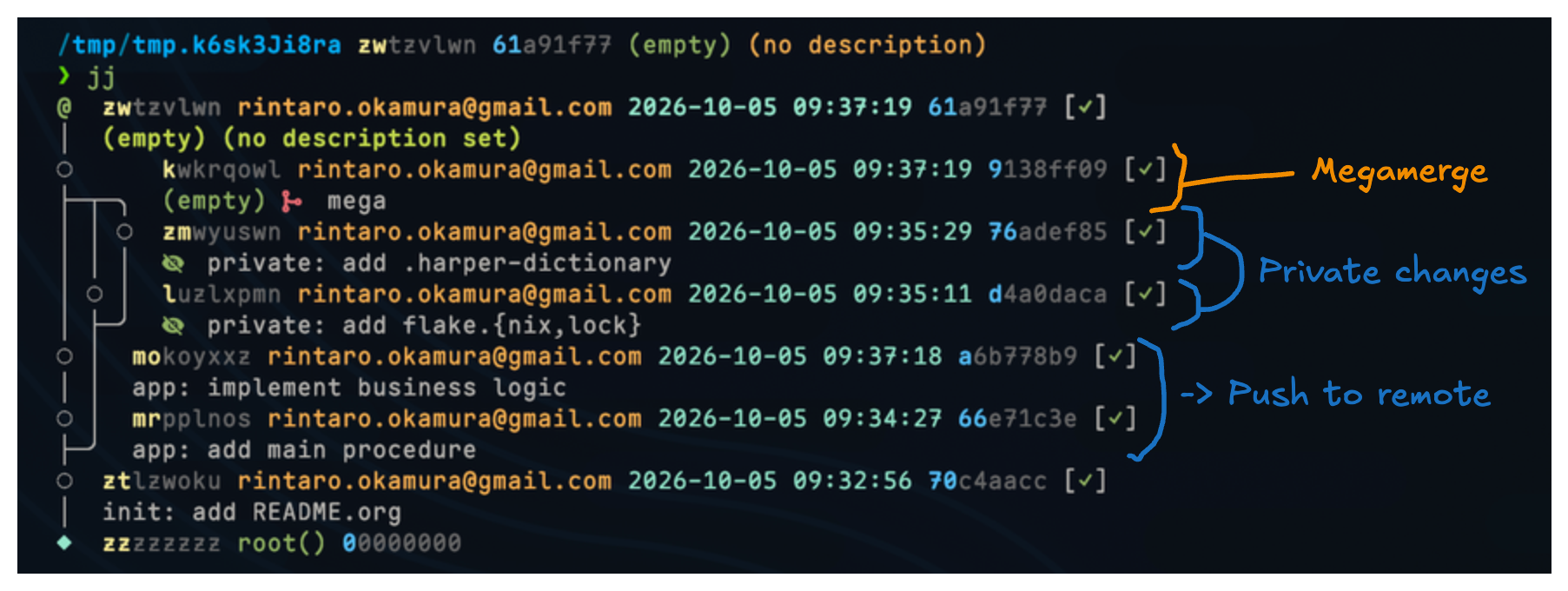
This way, flake.nix and flake.lock are always tracked by Git (Jujutsu), while being managed only in my local environment without being pushed to the remote. They are truly "private changes."
When I want to reflect changes on the remote, I create a bookmark for the relevant changes as follows:
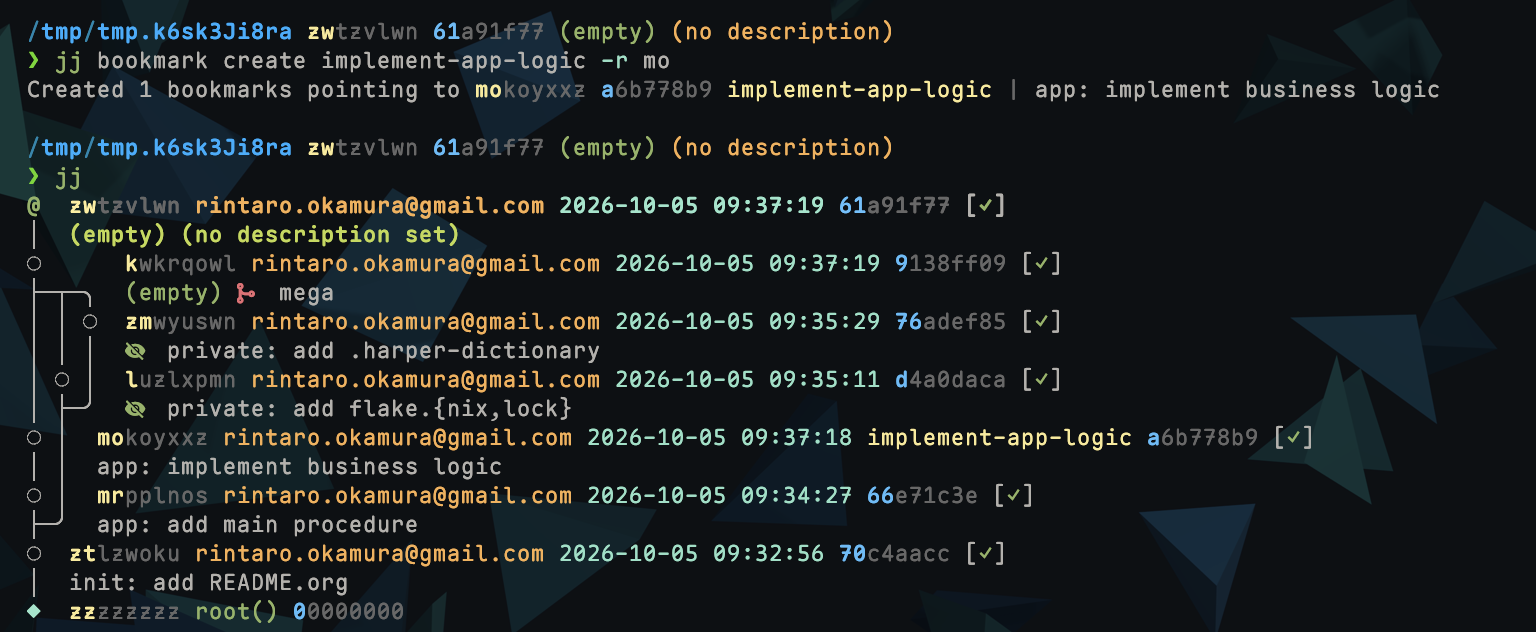
Then, I simply push it using jj git push --bookmark <bookmark>.
In this way, by creating changes intended for the remote on a branch separate from private changes, I can manage them so that private changes are not pushed.
However, there is still a risk that private changes could be pushed to the remote due to operational error.
jj configurations
To prevent pushing private changes to the remote, git.private-commits 3 is useful.
This option takes a revset. Any changes matching this revset will be blocked from being pushed.
revset-aliases
To identify changes that should not be pushed to the remote, I use revset aliases.
I manage the types of changes based on prefixes in the description (commit message) such as "private:", "wip:", "todo:", "mega", etc. Here, I treat changes whose description starts with "private" as private changes. To support this rule, I create a revset alias as follows:
[revset-aliases]
'private()' = 'description(glob:"private*")'
Evaluating private() lists only the changes with descriptions starting with "private", as intended.
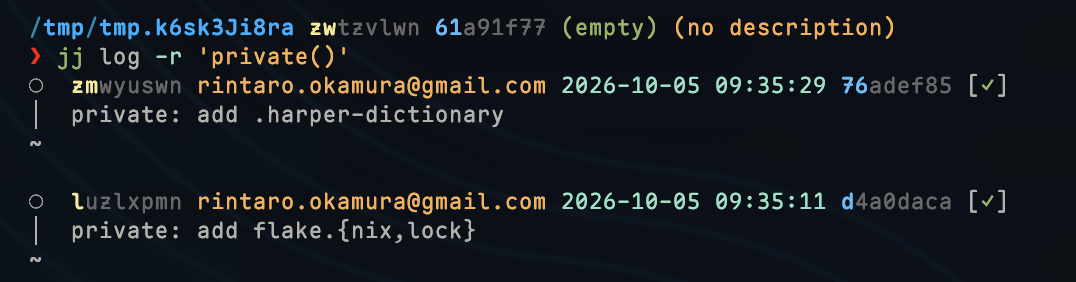
In addition to private changes (private), I also define wip (work in progress), todo (incomplete), and mega (formal changes for Megamerge) as revset aliases.
[revset-aliases]
'wip()' = 'description(glob:"wip*")'
'todo()' = 'description(glob:"todo*")'
'private()' = 'description(glob:"private*")'
'mega()' = 'description(glob:"mega*")'
'local()' = 'wip() | todo() | private() | mega()'
I also define a local() revset alias to handle all of these together.
Using this revset alias in git.private-commits, it prevents the pushing of changes that match local() and their descendants.
[git]
private-commits = 'local()'
While git.private-commits is a robust way to prevent accidental pushes, it only handles the "what not to push" part. Sometimes, you want to perform additional checks—such as running a linter or a test suite—immediately before the push happens.
This is where a custom jj push alias becomes useful. Before I discovered the git.private-commits option, I relied entirely on this alias as my primary guardrail. Even now, I continue to use it to integrate tools like pre-commit into my workflow.
jj push alias
In the Jujutsu configuration file, you can set aliases 4. You can assign jj subcommands and arguments to any alias.
Additionally, using the jj util exec subcommand 5, you can execute arbitrary external commands via jj.
By combining these, I created a jj push alias for pushing to the remote.
The functionality of jj push is as follows:
- Verify that changes that should not be pushed to the remote are not included in the push target
- Run
pre-commitbefore pushing - Execute
jj git pushto push changes to the remote
One minor drawback of Jujutsu is that it doesn't natively support Git hooks, such as pre-commit.
Therefore, I have configured pre-commit to run within the jj push alias.
Essentially, it's no longer a "Pre commit" but rather a "Pre push" check.
I've set it up so that if the pre-commit command fails, the push is stopped; otherwise, the push proceeds.
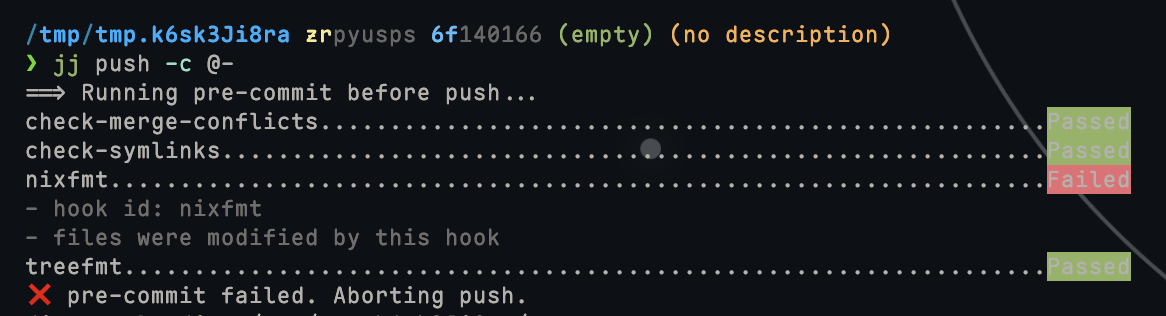
jj push Alias Example
Based on the above, I have configured the jj push alias as follows:
https://github.com/rinx/dotfiles/blob/d1033370a8cb2142a2c506d3131da5cb28633f6d/jjconfig.toml#L45-L81
[aliases]
push = [
  'util',
  'exec',
  '--',
  'bash',
  '-c',
  '''
## Run check if pre-commit is available
if type pre-commit >/dev/null 2>&1; then
    echo "==> Running pre-commit before push..."
    pre-commit run --all-files

    if [ $? -ne 0 ]; then
        echo "❌ pre-commit failed. Aborting push."
        exit 1
    fi
else
    echo "⚠️  pre-commit not found. Skipping checks."
fi

## Extract the target Revset from command line arguments. Use default `::@` if not specified
echo "==> Checking for forbidden markers in pushable commits..."
targets=$(echo "$@" | grep -oP '(?<=(-b|--bookmark|-c|--change|-r|--revision)\s)[^ ]+')
if [ -z "$targets" ]; then
  target_revset="::@"
else
  target_revset="::(${targets//$'\n'/|})"
fi
## Verify that no unintended changes are included in the push target
if [ -n "$(jj log -r "$target_revset & mutable() & local()" --no-graph --ignore-working-copy -T 'commit_id')" ]; then
    echo "❌ Commits to be pushed contain wip/todo/private/mega markers. Aborting push."
    exit 1
fi

## Execute push to remote
echo "==> Pushing changes to remote..."
echo "==> jj git push $@"
jj git push $@
''',
  '',
]
By preparing simple guardrails as aliases, you can use Jujutsu with more peace of mind. I encourage you to build the optimal workflow and aliases that suit your own usage.
This article was translated with AI assistance and reviewed by the author.